
How to set up your artwork correctly
Preparing print-ready artwork can be challenging. To help you avoid delays and achieve the best possible print results, we've put together the artwork guidelines below. Professional artwork can be created using design software such as Adobe Illustrator, Adobe InDesign or ArtPro.Need assistance? With our Artwork Service, our specialists can review, correct or optimise your files before production. Simply choose between the Basic package (from £30 + VAT) and the Premium package (from £65 + VAT), upload your artwork and we'll take care of the rest.
Artwork setup guidelines:


Label Structure
Depending on your label design and the finishing techniques selected, your label may consist of some or all of the layers shown below. To illustrate all available options, we have included every layer that may be used during production. The standard layers are highlighted in light blue.
Die Cut
Digital Spot Varnish
Hot Foil
Digital Print (CMYK)
Material
Backing material
Not sure yet?
Book an Artwork Service
We'll take care of your artwork. Choose between our Smart (from £30 + VAT) and Pro (from £65 + VAT) artwork services, depending on the level of support you need. Simply select a package and upload your files. Our graphics team will check your artwork, make any necessary corrections and provide a report outlining the issues identified and the amendments made. We'll make sure your files are ready for print.

Essential artwork checks and technical set-up to ensure your file is print-ready.
Advanced artwork checks and technical set-up, including preparation for special finishings such as hot foil and embossing.
Need a little help?
Artwork Assistant
Generate artwork templates with the correct specifications or check your existing files before upload. Our Artwork Assistant tools help you prepare print-ready artwork quickly and easily.
Need some guidance?
Video Tutorials
Learn how to prepare your files for print with our easy-to-follow video tutorials. Follow each step and make sure your artwork is set up correctly for production.
Artwork Requirements for Labels with Finishings
Hot Foil Stamping
Hot foil stamping is a premium finishing technique used to add a metallic foil to selected areas of the label, creating a distinctive visual effect and enhancing perceived quality.
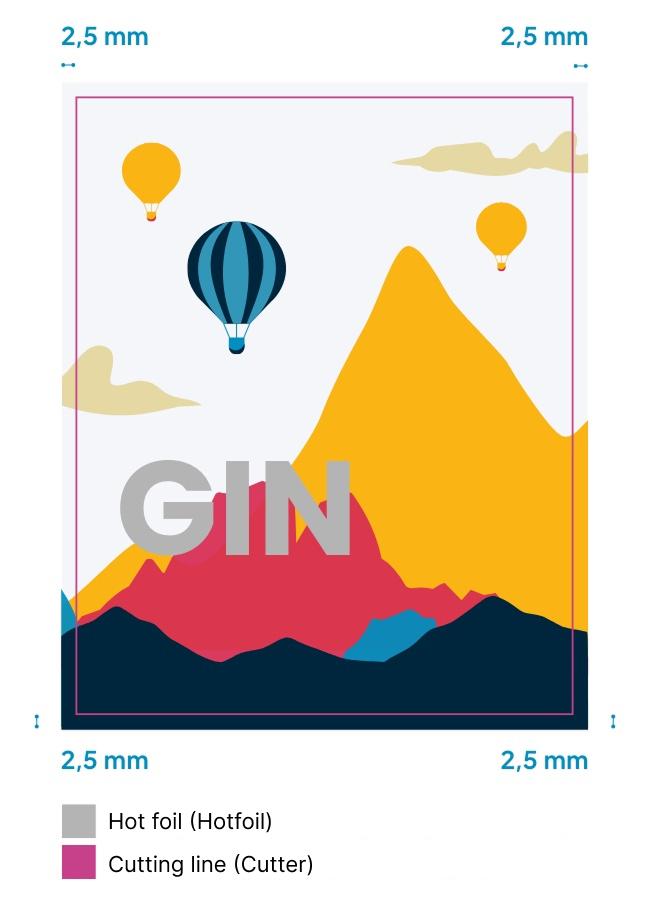
The hot foil area must be created as a spot colour named “Hotfoil” and set to overprint.
Minimum line thickness: 0.2 mm
Recesses: 0.4 mm
Safety margin: 2 mm
Additional recommendations
Very fine details may not be suitable for large areas of hot foil stamping. Large foil-covered areas can only be produced to a limited extent and may result in gaps in the foil application. Hot foil stamping can only be applied as a solid colour; gradients and tonal variations are not possible. For complex designs, we recommend submitting your artwork for review before placing your order.
Blind Embossing
Blind embossing is a premium finishing technique that creates a raised design without the use of ink or foil. It adds texture and depth to the label, creating a subtle and elegant tactile effect.
The embossing area must be created as a spot colour named “Embossing” and set to overprint. Embossed elements cannot be die-cut and must remain within the specified safety margin.
Minimum line thickness: 0.4 mm
Recesses:0.6 mm
Safety margin: 2 mm
Additional recommendations
Very fine details may not be suitable for large embossed areas. Large embossing elements may require additional technical evaluation to ensure the best possible result. We offer a wide range of embossing profiles, including flat, rounded, crowned, sharp-edge, multi-level and textured finishes, allowing you to achieve the look and feel that best suits your design. For complex designs, we recommend submitting your artwork for review before placing your order.
Relief Embossing
Relief embossing combines hot foil stamping with blind embossing to create a premium finish with both metallic brilliance and a raised tactile effect. This finishing technique enhances selected design elements, adding depth, texture and visual impact to the label.
The embossing area must be created as a spot colour named “Embossing” and set to overprint. Relief embossing cannot reproduce gradients or tonal transitions and should be supplied as solid artwork only. Embossed elements cannot be die-cut and must remain within the specified safety margin.
Minimum line thickness: 0.4 mm
Recesses: 0.6 mm
Safety margin: 2 mm
Additional recommendations
Very fine details may not be suitable for large embossed areas. Large relief embossing elements may require additional technical evaluation to ensure the best possible result. For complex designs, we recommend submitting your artwork for review before placing your order.
Digital Spot Varnish
With Digital Spot Varnish, selected areas of the printed product are enhanced with a varnish coating, creating a visual and tactile contrast with the rest of the surface. The areas to be finished must be set up as a spot colour named “Spotvarnish”. All spot varnish elements must be set to overprint and should comply with the minimum line and gap requirements.
Minimum line thickness: 0.3 mm
Recesses: 0.7 mm
Safety margin: 10 mm
Additional recommendations
Very large, fully coated varnish areas may lead to unwanted effects:
– Material behaviour: Surface tension may cause the material to contract, resulting in waviness or deformatio
– Bubble formation: Large varnished areas may develop bubbles, particularly on open-pore materials
– Premium Proof: If you are unsure about the final result, we recommend ordering a Premium Proof in advance to assess the material, varnish behaviour and visual effects under real production conditions
– The spot varnish is only slightly perceptible to the touch and cannot be compared to a raised varnish
– Elements finished with spot varnish do not adhere at the edges and therefore cannot be extended to the bleed
Recommended Design Software
To create professional print files, we recommend using Adobe Illustrator or Adobe InDesign. This software allows you to set up your artwork accurately and in accordance with our artwork requirements. Adobe Illustrator and Adobe InDesign are registered trademarks of Adobe Inc.PANTONE® colours
For digital printing, Pantone colours are reproduced as accurately as possible. Exact colour matches cannot be guaranteed, and metallic or neon Pantone colours cannot be reproduced digitally.
Please set Pantone colours as spot colours and name them using the official Pantone designation. Only Pantone® Coated (C) and Pantone® Uncoated (U) colours are accepted. Pantone colours are available at an additional cost. We will review your request and provide a quote.
PANTONE® is a registered trademark of Pantone, LLC.
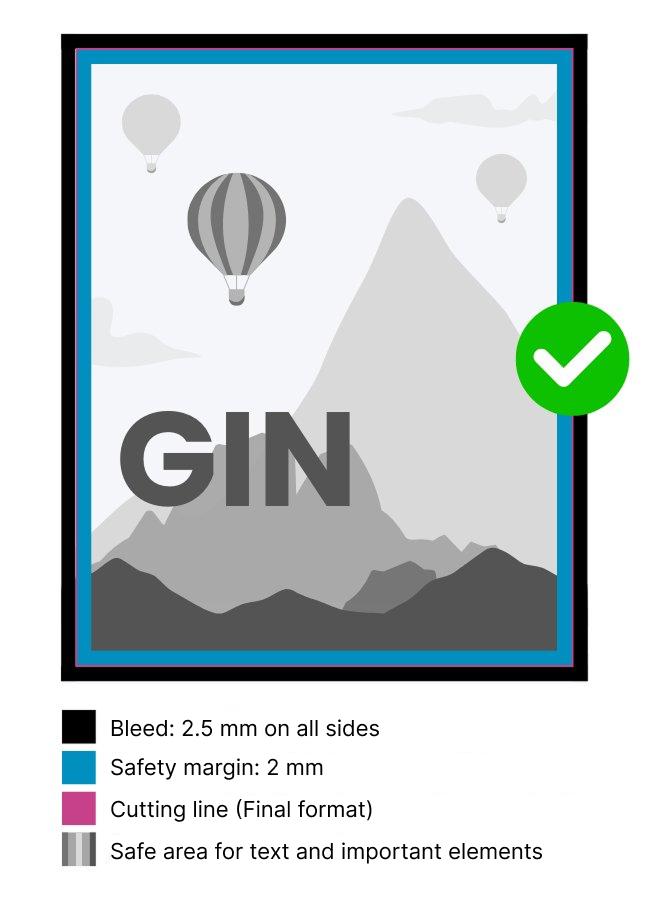
Our tip: print your design at home and place it on your product to make sure all text and important design elements are clearly visible and easy to read.